Report Criteria
You can select the following report criteria:
- Department Group
- Department
- Supplier
- Line Code: A specific line code can be entered
- Parts marked for stocking
- Parts marked for non-stocking
- Parts marked for consigned
- Do not consider On Hands
- Parts that are On Hand
- Parts with no On Hand
Usage Criteria
- Have Sold
- Have Not Sold Number of parts
You are required to enter a date range after you click the Print button.
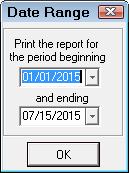
The Parts Usage Report runs.
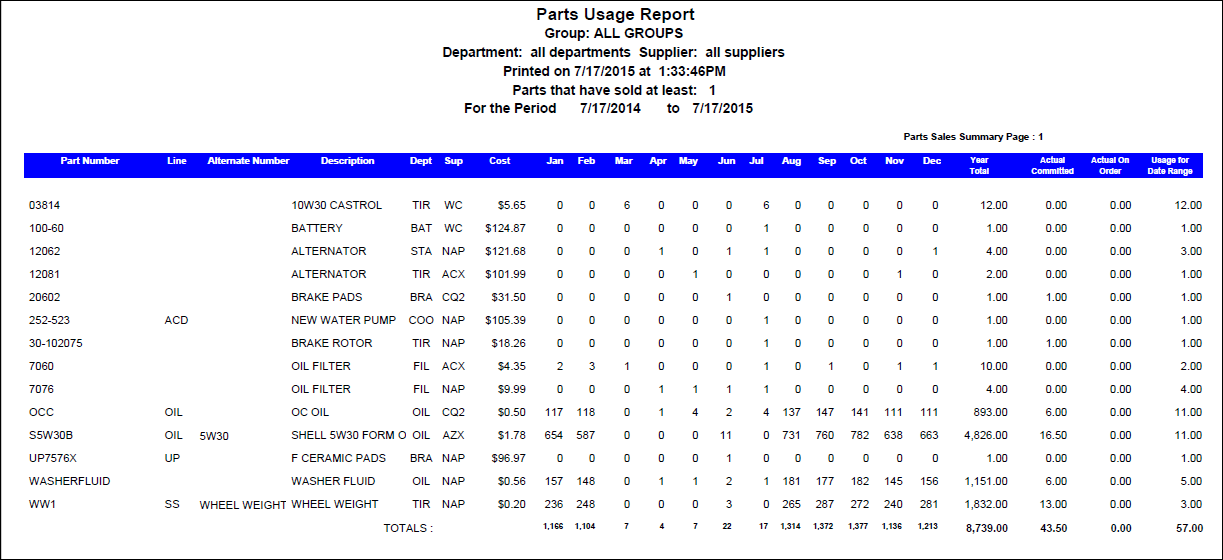
Report Sample
Parts are listed individually and not grouped by parts department or supplier.
Report Information
| Column | Description |
|---|---|
| Part Number | |
| Line | |
| Alternate Number | |
| Description | |
| Dept | Parts Department Code |
| Sup | Supplier Code |
| Cost | Parts Cost (Average Cost) |
| Jan through Dec | Monthly sales totals for the last 12 months of sales. At the end of each month, the next month is reset to 0. |
| Year Total | Total sold for the last 12 months |
| Actual Committed | Quantity on Work in Progress Repair Orders |
| Actual On Order | Quantity on Purchase Orders not yet received |
| Usage for Date Range | Quantity sold in the date range you specified for this report |