When you open the Fleet Wizard, the first step is to choose the account type on the Fleet Type tab. Then, you select the appropriate accounts.
Searching for House and COD Accounts
The search process is similar for all three types of accounts: you click the Fleet button from an open ticket  , select the Fleet Type, and then the account(s) on the next tab(s).
You search for and select the house or COD account on the Client Fleet Name tab.
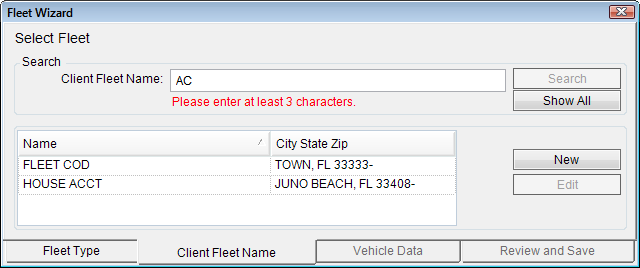
- Type in at least three characters in the Client Fleet Name field and click the Search button.
- Click the Show All button to clear the search results and repopulate the list with all house and COD accounts in the system.
Searching for National Accounts
You search for and select the national account on the National Account tab. The national accounts are highlighted in yellow.
This window opens with the Display All Fleets option selected, which means that the window displays all fleet account types - national, house, and COD. Because you must select a national account, de-select this option to see only the accounts you can select.
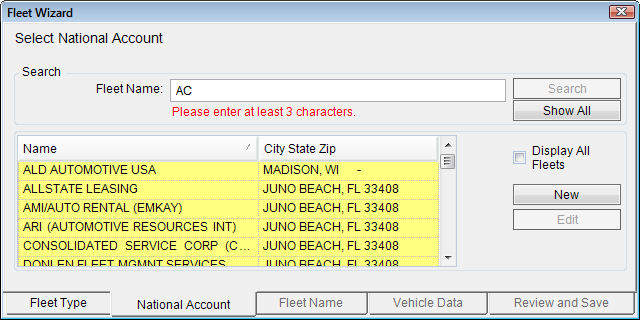
- Type in at least three characters in the Client Fleet Name field and click the Search button.
- Click the Show All button to clear the search results and repopulate the list with all national accounts in the system. (If the Display All Fleets option is selected, clicking Show All returns all fleet account types.)
Client Fleet Accounts
You search for and select the client fleets of the selected national account on the Fleet Name tab. The client fleet accounts of the selected national account are highlighted in yellow.
This window opens with the Display All Fleets option selected, which means that the window displays client fleets for all national accounts. Because you must select a client fleet account of the selected national account, de-select this option to show only the accounts you can select.
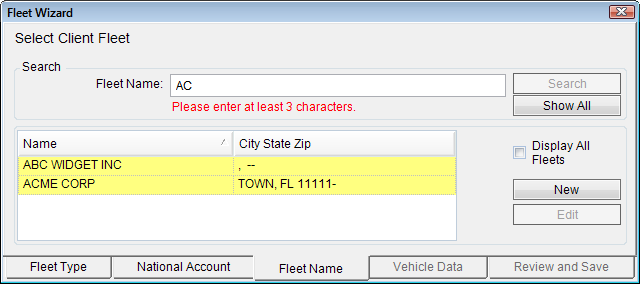
- Type in at least three characters in the Client Fleet Name field and click the Search button.
- Click the Show All button to clear the search results and repopulate the list with all national accounts in the system. (If the Display All Fleets option is selected, clicking Show All returns all fleet account types.)