Machine Name and Username
Several R.O. Writer tools, utilities, and features use and often display and/or required you to know the machine name and username of the current workstation where R.O. Writer Client is installed. These include:
The machine name and username are assigned by the Windows operating system.
-
The machine name is the Computer Name of the workstation.
-
The username is the name assigned to the user currently logged into the workstation.
You can find both the machine name and username in the Windows Control Panel.
Machine Name of the Current Workstation
You can find the machine name of the current workstation in the Windows Control Panel.
To Find the Machine Name
Complete these steps:
- Press the Windows Start key on the keyboard
 OR click the Windows Start button in the taskbar
  .
. - Select the Control Panel.
- Click System and Security > System > Computer Name.
-
The System setting in Windows opens displaying the machine name.
(You can also press the Windows and Pause Break keys to access this Windows setting directly.)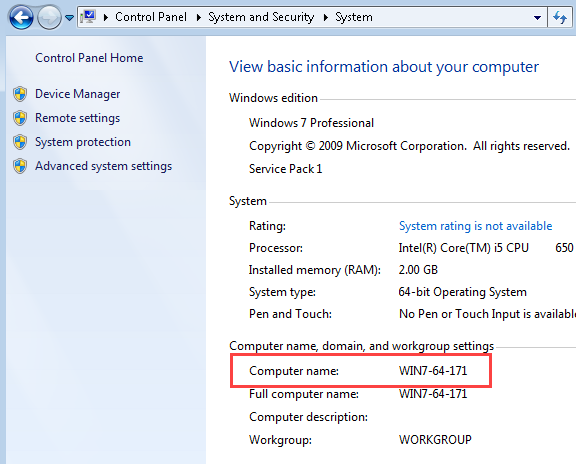
User Name of the Current User
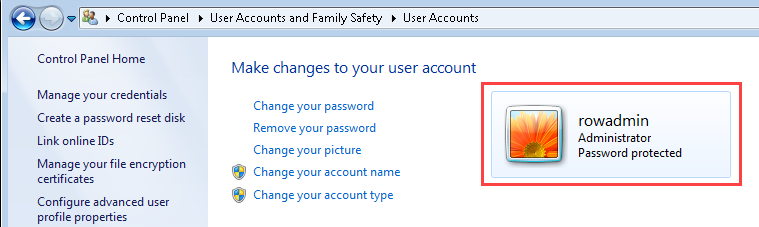
You can find the user name in the Windows Control Panel.
To Find the User Name
Complete these steps:
- Press the Windows Start key on the keyboard OR click the Windows Start button in the taskbar .
- Select the Control Panel.
- Click User Accounts (and Family Safety) > User Accounts.
-
The User Accounts setting in Windows opens displaying the user name.