One line in the search results table can represent a tire that is in local inventory and available from more than one online supplier. This occurs when the part number for the tire is the same at both sources.
NOTE: The tire with the best price appears on the line.
How to Know When a Tire is from Multiple Sources
Without opening the Tire Details window, there are two main ways to verify that a tire is from more than one source:
By Looking at the OH and Avail Columns
One of the fastest ways to tell is if you see quantity levels in both the OH and Avail columns. The OH column shows local inventory quantity. The Avail column shows the quantity from the tire supplier. Therefore, if there are values greater than zero in both columns, this tire is available locally and from a supplier.
Example 1: Local and Supplier with Some On Hand
In this example, the tire is in local inventory and available from an online supplier.
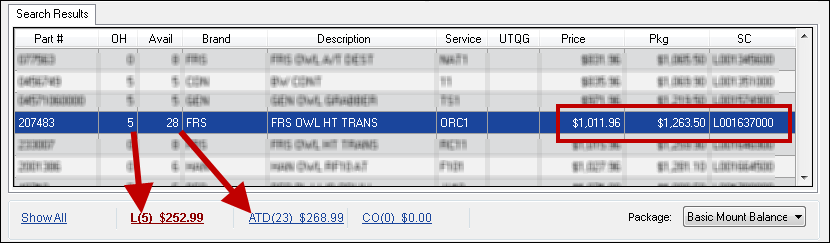
| The selected tire: | Because |
|---|---|
| Has 5 on hand in local inventory | There is a 5 in the OH column and a "(5)" in the Local inventory link. |
| Has 23 available from ATD | 23 appears in the ATD link. |
| Shows the local price | There is an "L" in the supplier code in the SC column. |
| Is not available from Carroll Tire | There is a "(0)" in the CO supplier link followed by "$0.00" for the price each. |
| Shows the local price on the line |
There is an "L" in the supplier code in the SC column. The Local inventory link is bold. |
By Looking at the Links Below the Search Results
Sometimes the tire is in local inventory but has no on-hand quantity. In this case, the OH column shows zero even though the tire is in local inventory. In this case, check the links below the search results. If you select a tire and there is a price each displaying in the Local link, that means the tire is in local inventory; there are just none on hand right now.
Example 2: Local and Supplier but None On-Hand
In this example, the tire is in local inventory and available from an online supplier. However, only the supplier has quantity available.
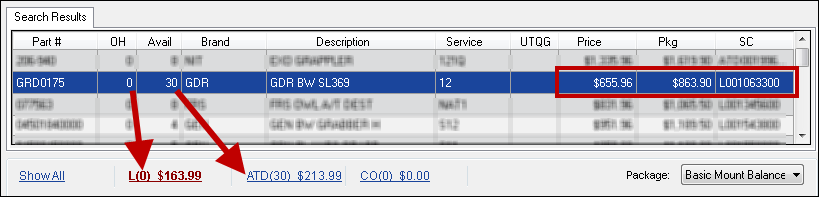
| The selected tire: | Because |
|---|---|
| Has zero(0) on hand | There is zero(0) in the OH column and the Local inventory link. |
| IS a local tire | There is a price each after the "(0)" in the Local inventory link. |
| Has 30 available from ATD | "30" appears in the Avail column and the ATD supplier link. |
| Is not available from Carroll Tire | There is a "(0)" in the CO supplier link followed by "$0.00" for the price each. |
| Shows the local price on the line |
There is an "L" in the supplier code in the SC column. The Local inventory link is bold. |