NOTE: These amounts are entered for each part in the Stock Information Section.
Report Criteria
You can select the following report criteria:
- Department Group
- Department
- Supplier
- Sort Order: Part No, Alternate Number, Description, Line Code
- Group On: No Grouping, Supplier, Department, Location, Line Code
- Line Code: A specific line code can be entered
NOTE: Only parts marked as stock are considered.
You do not enter a date range for the Parts Reorder Report. This report is a snapshot of the reorder amounts on the day the report is run.
Report Sample
The Parts Reorder Report is grouped by supplier. Each row is a part for that supplier.
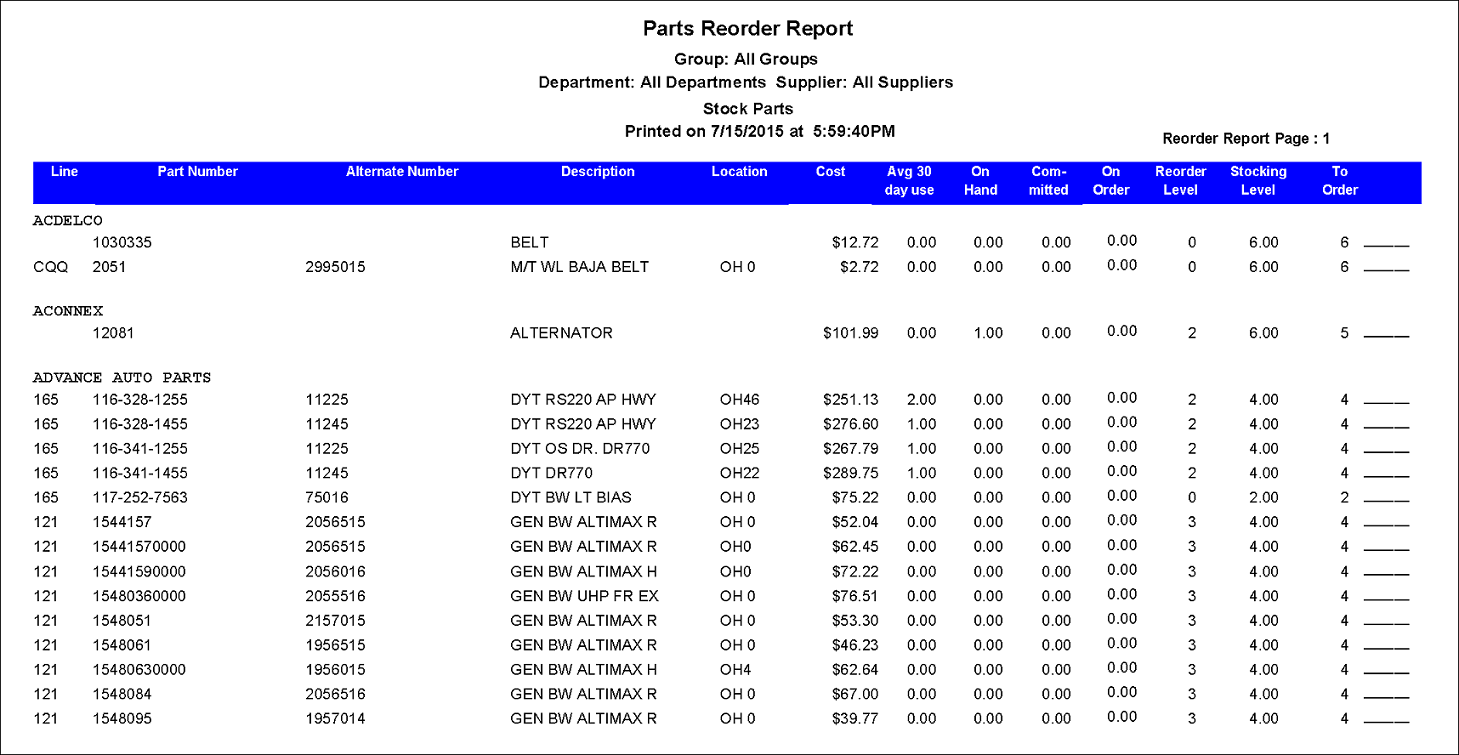
TIP: Run this report before you auto-build purchase orders.
Report Information
| Column | Description |
|---|---|
| Line | |
| Part Number | |
| Alternate Number | |
| Description | |
| Location | Part location |
| Cost | Part Cost (Average Cost) |
| Avg 30 day use Total Days | Today's Date-Start Date |
| Avg 30 Day Usage | Total number sold/(Total Days/30) |
| On Hand | |
| Committed | Quantity on Work in Progress repair orders |
| On Order | Quantity on Purchase Orders not yet received |
| Reorder Level | |
| Stocking Level | |
| To Order |