You can order parts and labor from the Alliance catalogs of Bumper to Bumper or Auto Value. Both catalogs are referred to as "My Place 4 Parts" in R.O. Writer.
To use these catalogs in Smart eCat, they must be properly configured as a
- Supplier with an electronic interface in Configuration
- Coverage in Smart eCat
Searching and Posting Parts from Alliance Catalogs in Smart eCat
Complete these steps:
- Open the catalog by clicking the button in the Quick Launch or in the Smart eCat toolbar
 .
. - Smart eCat opens displaying the Alliance catalog on the Catalog tab.
- Select the Category, Group, and Part Types. You can also search by part number or part type.
-
When all have been selected, click Go.

-
Click the Shopping Cart button to add parts to the cart.
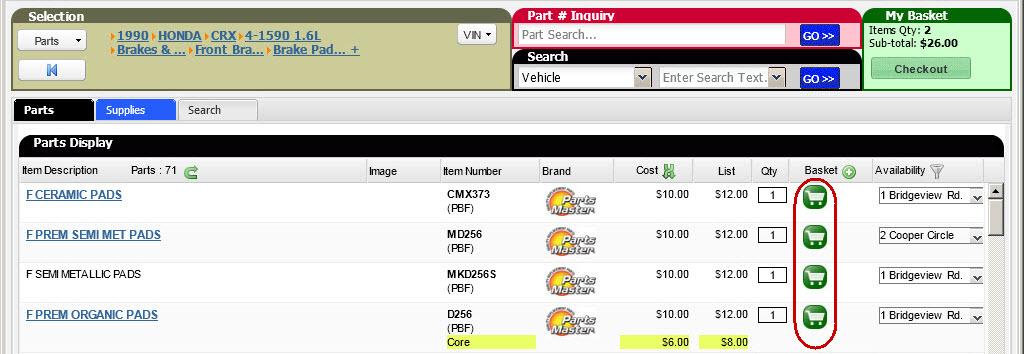
-
Click the Checkout button to view the shopping cart.
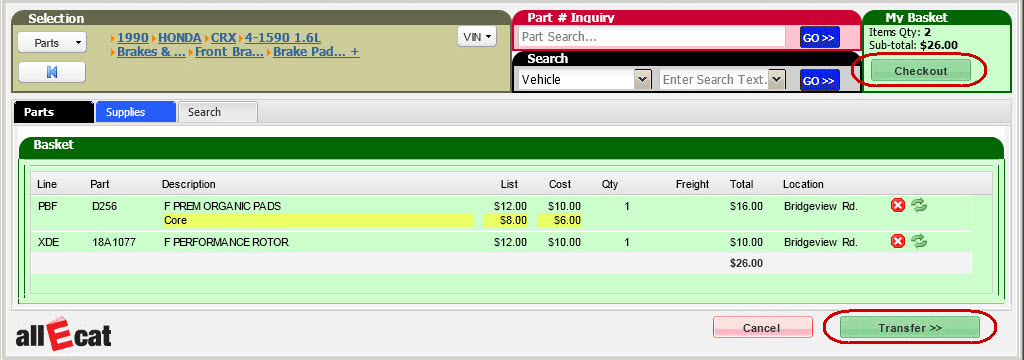
- Click the Transfer button to add the parts to the Posted Parts and Labor tab in Smart eCat.