Search Result Columns
The Search Results table shows matching tires in a list. You can click on any column to sort the list by the value in that column.
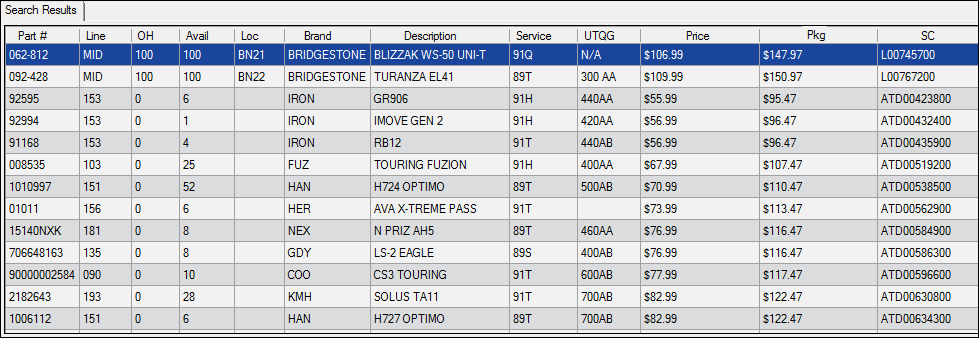
If the search was a Staggered Fitment Vehicles, there are two tabs: one for Front and one for Rear tires. The columns and are the same for the Front tab and the Rear tab.
| Column | Displays | Description |
|---|---|---|
|
Part # |
Part number |
The part number of the tire.
If a tire has the same part number in your local inventory and a supplier, the tire displayed could be from multiple sources. |
|
Line |
Line code |
Line codes are often added to parts to distinguish them from each other. |
|
OH |
Quantity on hand |
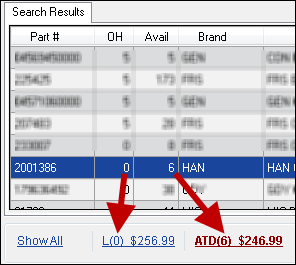
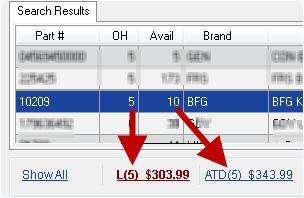
In Online mode, if the quantity is a zero(0), it can mean two things:
To find out, select the tire and check the sort links below the list. If the tire is in local inventory, the price each appears in the L link.
In Offline mode, the OH column displays zero(0) only if zero was selected as the Min Qty. |
|
Available |
Available quantity (Online Only) |
The quantity available from the online supplier. Click once on the tire and check the links to check the OH and available quantities from the supplier.
|
|
Loc |
Location |
This is the location entered in the part record on the Other Information tab. 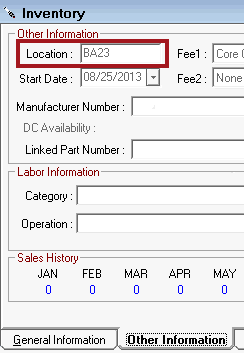
|
|
Brand |
Manufacturer |
This is the three-letter code of the brand name. |
|
Description |
Description |
The description of the tire. If this column is blank, no description was entered for the tire. |
|
Service |
Service |
The service If this column is blank, no service was entered for the tire. |
|
UTQG |
UTQG |
If this column is blank, no UTQG was entered for the tire. |
|
Price for the quantity |
This is the price of the minimum quantity selected for the search (in the Search Tires section). The price does not include the package. |
|
|
Package price |
This is the price of the minimum quantity selected for the search (in the Search Tires section) with the price of the package added. If you change the package, this price changes to match. |
|
|
SC, SM, or DM |
Cost or margin with the cost code on or off |
The heading of this column displays the name of the cost or margin link selected in the Search Tires section. Shop cost (SC) displays by default. |
To see the columns for offline search mode, click the following link: Search Results in Offline Mode.