This report compares sales and profits between two date ranges such as a comparison from last year to this year.
When the Print button is selected, the Date Selection window opens where you select two date ranges for comparison. You can use the Start Date and End Date fields or the Automatic Dates dropdown list.

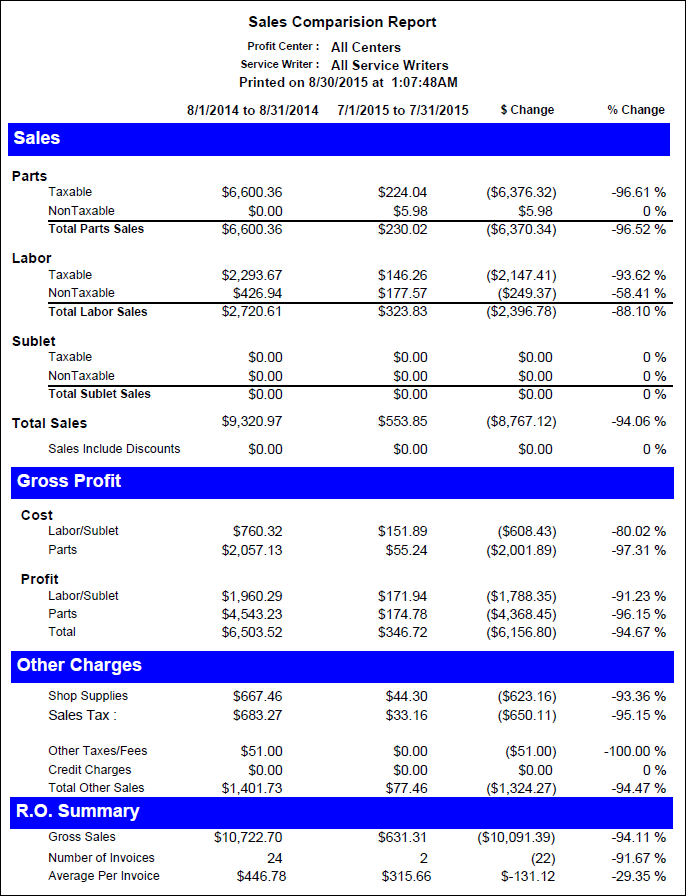
This report includes the following information:
| Column | Definition |
|---|---|
|
First Date Range |
Totals for the first date range |
|
Second Date Range |
Totals for the second date range |
|
$ Change |
The total dollar amount difference |
|
% Change |
The percentage of the difference |
Sales
- Parts Taxable and Non-Taxable + Core Charges and Taxable Fees - Discounts.
- Labor Taxable and Non-Taxable
- Total Labor Sales with discounts already subtracted
- Sublet Taxable and Non-Taxable
- Total Sublet Sales with discounts already subtracted
- Total Sales with discounts already subtracted
- Discounts total
Gross Profit
- Cost of Labor/Sublet
- Cost of Parts + Taxable Fees and Core Charges
- Total profit of Labor/Sublet
- Total profit of Parts
- Total profit of Labor/Sublet + Parts
Other Charges
- Shop Supplies
- Sales Tax
- Other Taxes/Fees = Non-Taxable Parts Fees
- Credit Charges = Fees charged to customers for using a credit card. This is an option in the Configuration module, Configuration > Repair Order > Taxes and Fees > Upcharge for credit card. This is a percentage of the total repair order amount that is set up.
- Total Other Sales - Shop Supplies + Sales Tax + Non-Taxable Parts Fees + Credit Charges
R.O. Summary
- Gross Sales = Total Sales + Total Other Charges
- Number of Invoices = Total number of repair orders closed
- Average Per Invoice= Average sales per repair order.
 Related Topics